Plataforma IA Android empresarial

Una ventana flotante.Todas las capacidades IA.

Starry AICore transforms any Android device into an AI workspace — persistent floating entry, 10 AI panels, autonomous Agent automation, live captions, screen understanding, and enterprise-grade remote management. Always one tap away, across every app.

Default 3-day activation-free trial for evaluation · OEM auto-activation via MAC…

How It Works

Always there. Never in the way.

A 60dp star bubble floats above every app. Tap to reveal a radial menu of 7 AI panels. Long-press to reposition. Each panel opens in its own floating window — draggable, resizable, IME-aware. Closed panels leave zero footprint.

01

Floating Bubble

A 60dp star bubble persists across all apps. Drag to reposition. Always within thumb reach.

02

Radial Menu

Tap the bubble to reveal 7 AI panels arranged in a ring. Spring-animated with glowing connection lines.

03

Floating Panels

Each panel opens as an independent window — draggable, resizable, and keyboard-aware.

AI Feature Panels

Seven panels covering the full spectrum of everyday AI needs — from conversation to creation, from classroom to conference room.

AI Assistant

Chat · Agent · Comparison

Intelligent conversational AI with three powerful modes: natural chat for Q&A, Agent mode for autonomous multi-step task execution, and comparison mode for side-by-side answer review.

  • Multi-turn conversation with context awareness and Markdown rendering
  • Voice input with real-time speech recognition (CN/EN/JA/KO)
  • Agent mode: AI autonomously plans and executes tasks
  • Side-by-side answer comparison for the same request
  • 20+ one-tap Quick Actions: volume, input source, apps, system
  • Chat export: copy all, save file, or share

Live Caption

Real-time transcription · Translation · AI summary

Dual-channel real-time speech-to-text with independent system audio and microphone capture. Translate on the fly, export to SRT, and generate AI-powered summaries of any session.

  • Dual audio sources: system audio (videos/meetings) + microphone (voices)
  • Real-time translation: sync captions translated to target language
  • AI summary: generate meeting notes or lecture summaries from captions
  • Mini caption bar: collapse to a thin bottom strip
  • Export formats: copy all, save as .txt, save as .srt
  • Caption history: 7-day history with review and management

AI Canvas

Sketch + Text → AI Art

Turn rough sketches into polished artwork. Draw a composition, add a text prompt for style and details, and let AI generate stunning images with three creation modes.

  • Three modes: text-to-image, sketch-to-image, or collaborative
  • Smart sketch analysis: AI interprets your drawing before generating
  • Abstract sketch handling: prompts for style when ambiguous
  • Multi-version history: swipe through generated results
  • Full toolkit: brush, eraser (3 sizes), undo, clear, voice input
  • Image actions: fullscreen preview, copy, save to gallery, share

Handwriting

Write math · AI solves · Voice instructions

Handwrite math problems and formulas — AI recognizes, solves, and shows step-by-step solutions. Voice instructions customize how answers are delivered.

  • Math-focused: recognizes equations, expressions, and formulas
  • Voice augmentation: speak instructions like 'show detailed steps'
  • Canvas tools: brush, eraser (fine/standard/large), undo, clear
  • Result actions: copy text, copy as image, share
  • Multi-line recognition: write multiple problems together

Roll Call

Face detection · Random picker · Roster

Make classroom interaction exciting with AI-powered random student selection. Import a roster, capture a class photo, and let face detection randomly pick the next participant.

  • Roster management: edit and save student name lists
  • Face detection: AI detects all faces in a class photo
  • Random selection: animated spinning picker
  • Flexible capture: camera (front/back) or upload photos
  • Lock & re-roll: lock selection or pick again
  • Demo mode: built-in demo photo for quick trial

Circle & Know

Screen OCR · Object recognition · Visual search

Circle anything on screen — AI instantly recognizes text, objects, products, plants, and more. Like Google Lens built into your Android interface, always one tap away.

  • Two selection modes: rectangular drag or freehand circle drawing
  • Flexible recognition pipeline for speed and accuracy balance
  • Rich results: extracted text, object tags, confidence scores
  • Follow-up chat: ask questions about recognized content
  • Action menu: copy text, translate, search, save image, share
  • History: browse past recognition results

Settings

AI config · Web Console · License · Updates

Central control panel for AICore. Manage cloud connections, switch reasoning profiles, launch the Web Console for remote administration, check for updates, and monitor license status.

  • Cloud connection: configure server URL, test connectivity
  • Reasoning profile switching for different tasks and deployments
  • Web Console: one-tap launch LAN admin panel (port 8080)
  • OTA updates: check for and install app updates
  • License: view activation status, type, expiry, re-verify
  • Remote debug: LAN logs, cloud upload, remote debug mode
Verified Product Experience

Every visual below is grounded in the current product screenshots. We only describe what the interface demonstrably shows: panel layout, action density, live state, and the handoff between perception and execution.

A command center that can understand context and trigger real system actions
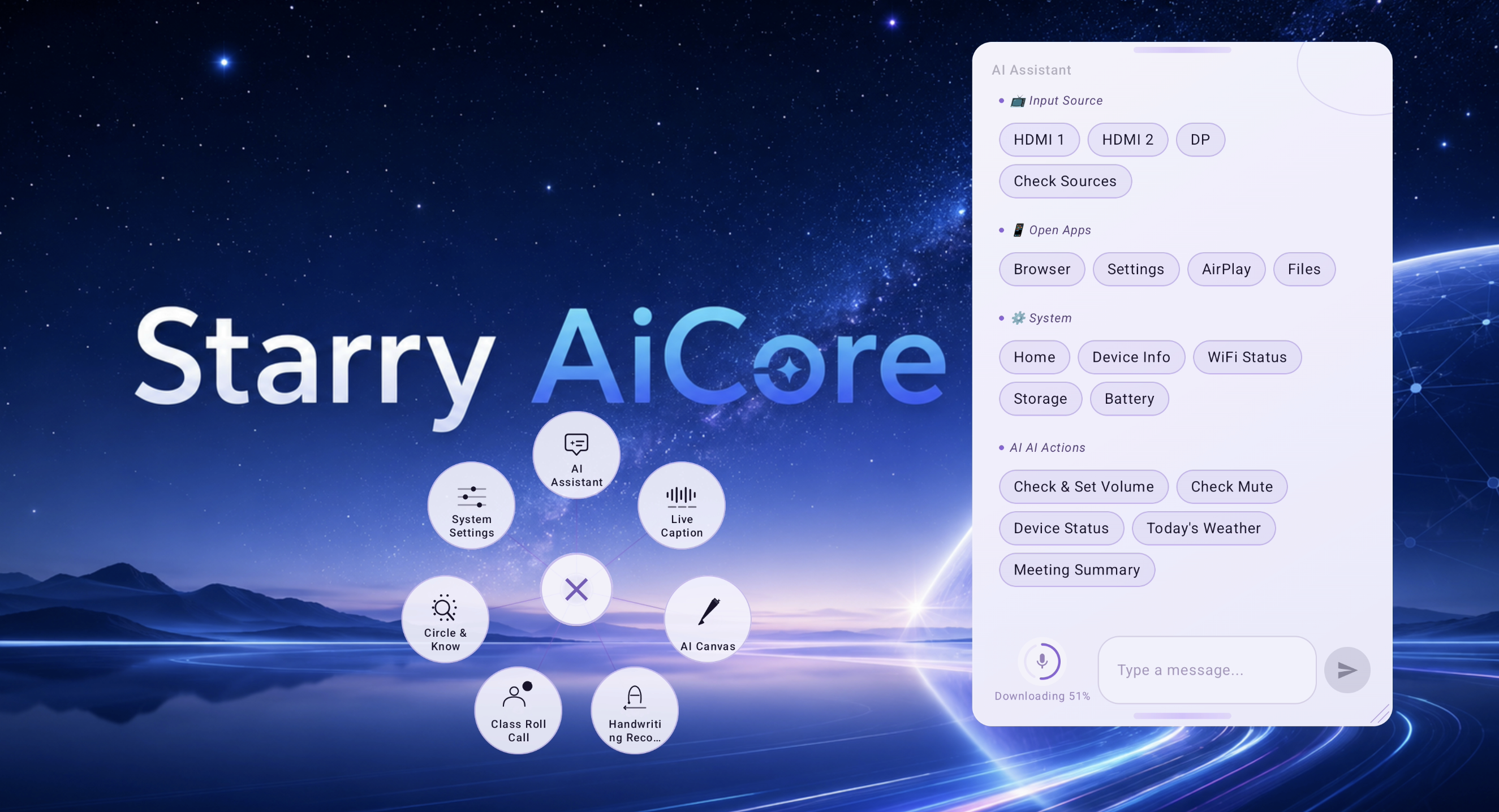
AI Assistant

A command center that can understand context and trigger real system actions

This screen shows the assistant panel alongside the floating radial launcher. The visible quick actions cover input source switching, app launching, device status checks, volume control, mute checks, weather, and meeting summary generation.

  • Floating launcher and assistant panel appear together, confirming cross-app access from the system overlay.
  • Quick actions are grouped by task type: input source, apps, system, and AI actions.
  • Voice entry, text input, and send controls are visible in the same workspace.
Dual-channel live transcription with independent translation views
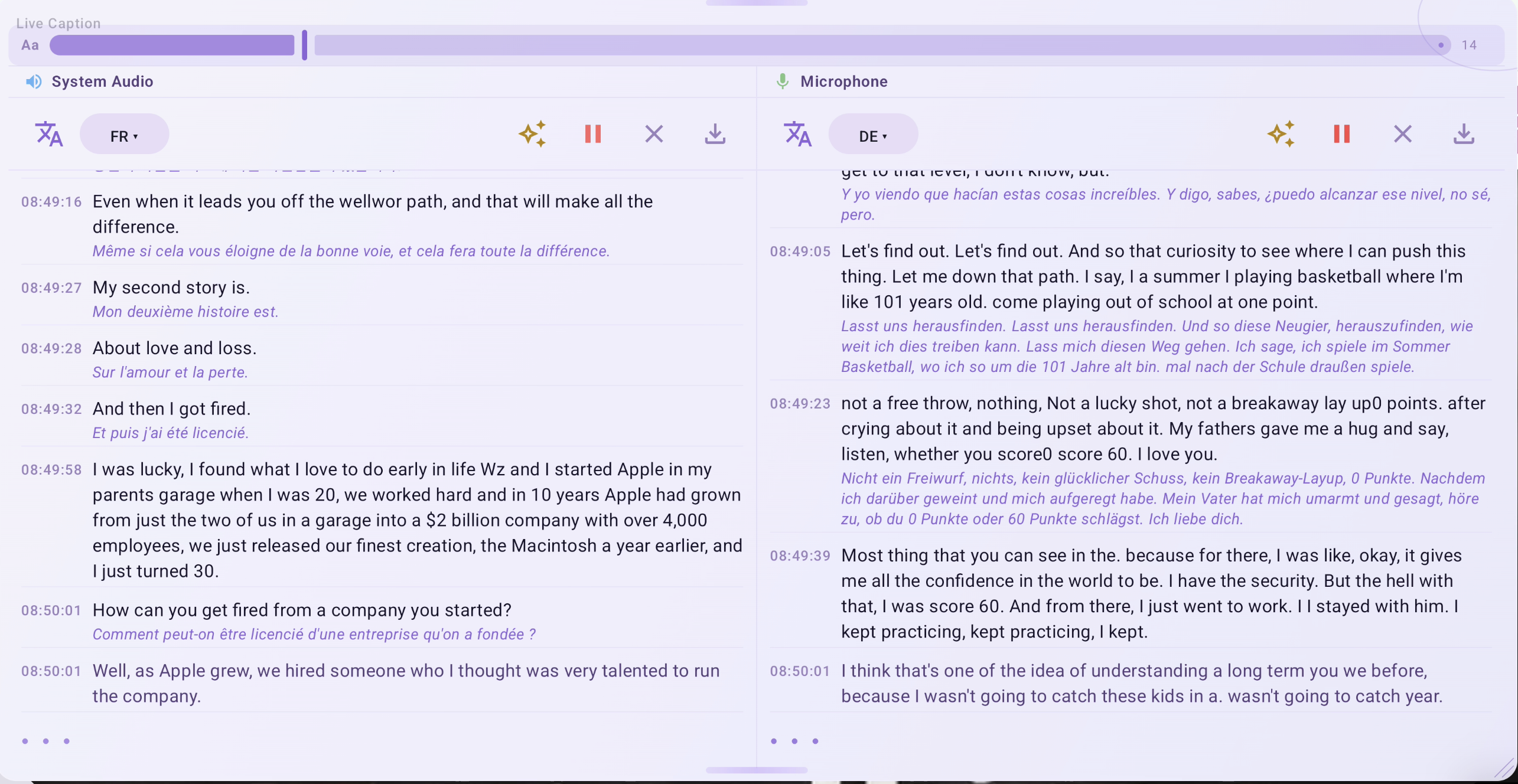
Live Caption

Dual-channel live transcription with independent translation views

The screenshot shows two synchronized streams: system audio on the left and microphone on the right. Each side exposes its own target language selector, while the transcript area preserves timestamps and translated text underneath the original speech.

  • System audio and microphone are processed in parallel instead of being merged into a single caption feed.
  • Each channel has its own language setting visible in the UI.
  • The panel exposes summarize, pause, clear, and export-style actions directly in the transcript header.
From a freehand circle to structured recognition results in one continuous flow
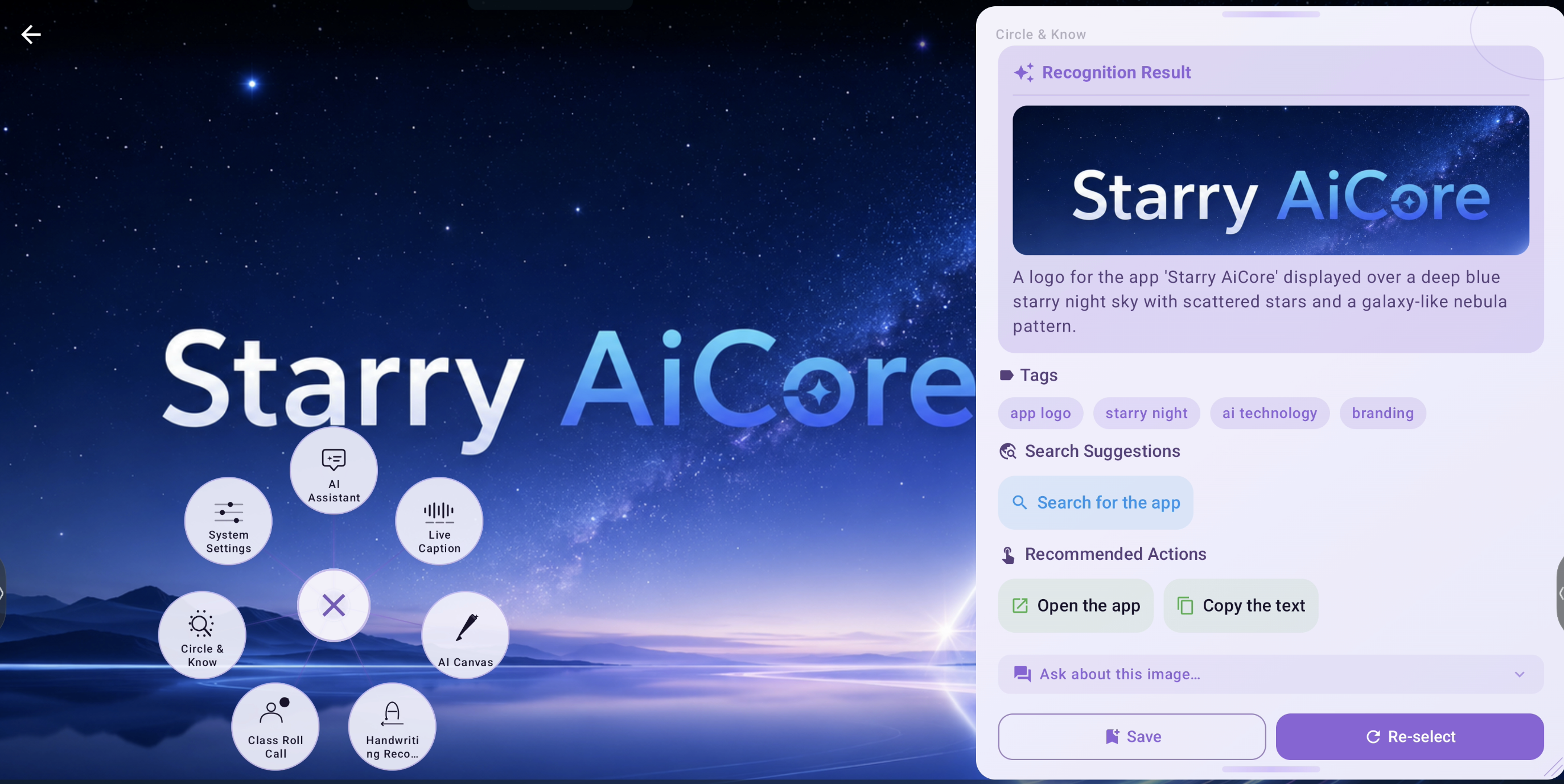
Circle & Know

From a freehand circle to structured recognition results in one continuous flow

The recognition result view verifies that Circle & Know does more than OCR. After selection, it returns an image preview, a natural-language description, semantic tags, search suggestions, and follow-up actions such as opening the app or copying text.

  • Recognition output includes both visual preview and semantic explanation.
  • Tags and search suggestions are part of the native result card, not an external browser handoff.
  • Action buttons confirm that extracted content can continue into downstream tasks.
Sketch-to-image starts from a rough concept, not a polished prompt
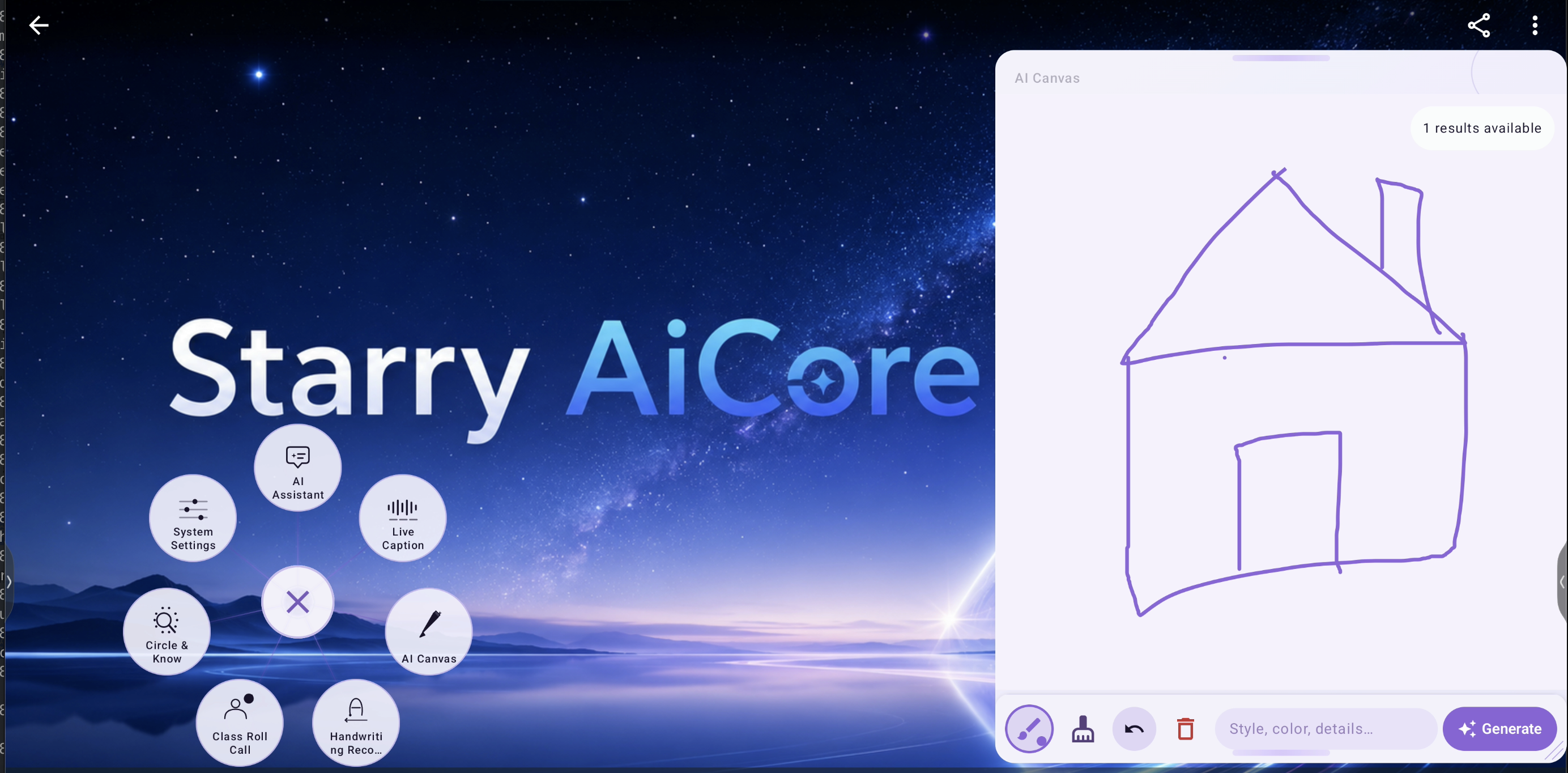
AI Canvas

Sketch-to-image starts from a rough concept, not a polished prompt

The canvas view shows a hand-drawn house, an inline style prompt field, and a generate action in the same panel. The UI makes it clear that composition and textual direction are authored together before inference starts.

  • Brush, eraser, undo, delete, prompt input, and generate controls are all present on one screen.
  • The screenshot confirms support for sketch-first creation instead of prompt-only generation.
  • A results notice is already visible, indicating iterative generation rather than a one-shot workflow.
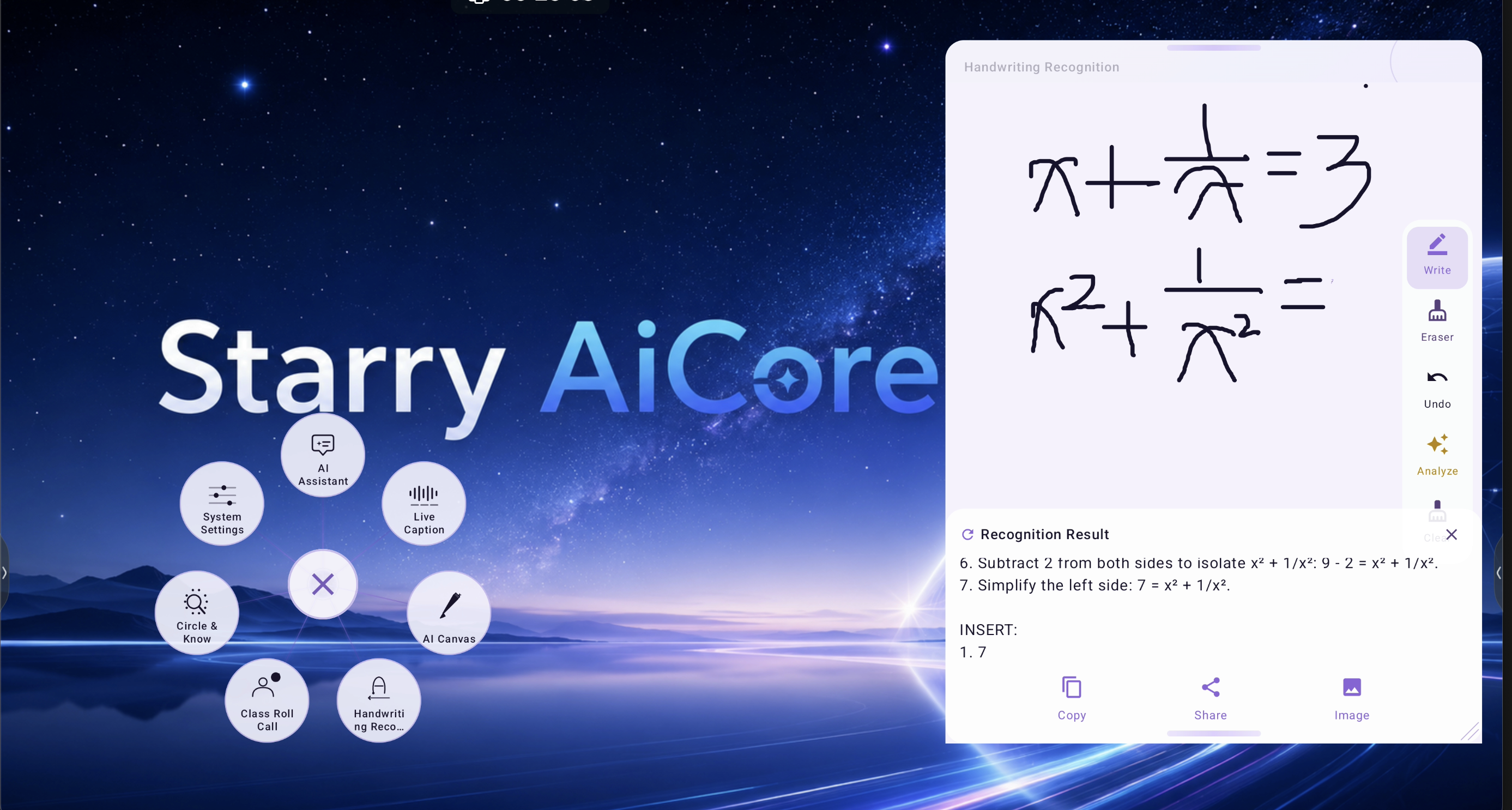
Mathematical handwriting is recognized, analyzed, and returned as actionable output
Handwriting

Mathematical handwriting is recognized, analyzed, and returned as actionable output

The panel shows handwritten expressions on the upper canvas and a recognition result area below. The result view includes structured explanation text plus copy, share, and image export actions, which confirms the feature is designed for reuse after recognition.

  • Recognition is separated from the writing canvas, keeping the solving output readable.
  • Write, erase, undo, analyze, and clear tools are visible at the right edge.
  • Output actions support direct redistribution of the recognized result.
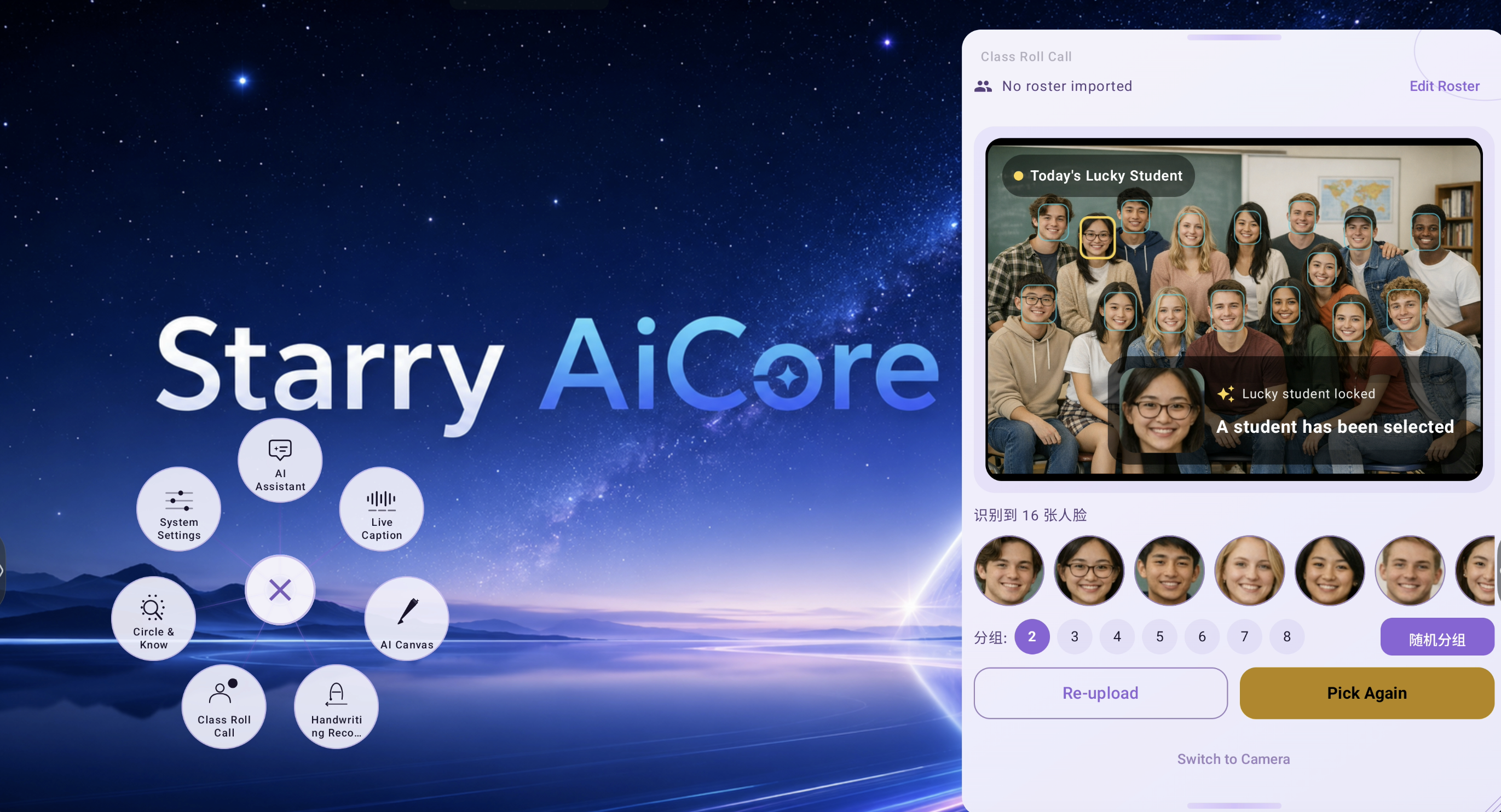
Face-aware classroom interaction with group control and instant reselection
Class Roll Call

Face-aware classroom interaction with group control and instant reselection

The screenshot confirms the teaching scenario directly: the system detects 16 faces, highlights candidate students in the class image, locks a selected student, and exposes grouping plus re-pick controls for live classroom use.

  • Detected face count is surfaced explicitly in the interface.
  • The selected student is enlarged and called out separately from the full group photo.
  • Grouping controls and re-upload / pick again actions show this is built for repeated in-class interaction.
Agent Automation Engine

The core differentiator. Autonomous, secure, and learning from every task.

Execution Pipeline

1
Natural Language Input

User speaks or types a task in natural language

2
AI Planning

AI planner decomposes into step-by-step action plan

3
Screen Reading

AccessibilityService reads current UI tree state

4
Action Execution

Agent executes: taps, types, scrolls, navigates autonomously

5
Result Verification

Checks result, replans if needed, reports completion

Capability Matrix

CapabilityExampleCategory
Open appsOpen Chrome browserApp Control
Navigate UISettings → Display → BrightnessUI Navigation
System controlSet volume to 50%, switch to HDMI 1System
Query infoCheck storage space, battery levelInformation
Cross-app tasksOpen WeChat, send message to Zhang SanMulti-App
Complex logicCheck mute → unmute → report volumeMulti-Step
Input automationSearch 'weather' in browserInput
Status reportsGenerate full device status reportReporting

Safety Guarantees

  • Security keyword filtering blocks sensitive operations
  • Max step limit (default 10) prevents infinite loops
  • User can manually terminate at any time
  • Full execution logging for audit and debugging
Skill Learning System

Every completed task makes the Agent smarter. Reusable skills, searchable library, cross-device sharing.

Automatic Learning

After each successful task, the Agent analyzes the execution pattern and creates a reusable skill template with JavaScript automation code.

Skill Library

All learned skills stored locally with metadata — name, description, JS template, verification status. Full CRUD via Web Console.

Smart Reuse

When a new task matches an existing skill, the Agent reuses the proven template instead of planning from scratch — faster, more reliable.

Cross-Device Sharing

Export skills as JSON and import on other devices. Build a skill library once, deploy everywhere.

Search & Verify

Search by keyword. Mark skills as verified for production. Delete obsolete or unreliable ones.

Enterprise Management

OTA updates, remote configuration, and hot-reload — manage fleets of devices without touching them.

OTA Auto-Update

Keep every device on the latest version automatically.

  • Automatic version detection via remote update.json
  • Floating update dialog — non-blocking, no workflow interruption
  • Background download with real-time progress (DownloadManager)
  • One-tap install via FileProvider
  • Force update option for critical releases
  • Release notes display for every update

Remote Config & Hot Reload

Change product behavior without shipping a new APK.

  • Panel visibility: show/hide feature panels remotely per device group
  • AI behavior switching: adjust reasoning profiles without app update
  • Prompt hot-reload: edit system prompts via Web Console instantly
  • License policy: adjust per-panel activation policies remotely
  • Brand customization: entry icon, color scheme per client
  • Feature flags: toggle settings sections, debug features, experiments
  • Server endpoints: update all service URLs remotely
Activation & Licensing

Default 3-day trial, activation-code support, and commercial licensing for OEM and enterprise deployments.

Default 3-day activation-free trial for evaluation · OEM auto-activation via MAC whitelist · Enterprise activation by license key. Email support@starry-aicore.com to request an activation code or discuss commercial cooperation. AES-256 encrypted storage. Panel-level policy gating.

Global Ready

12 languages, one codebase. RTL support included.

English简体中文日本語한국어EspañolFrançaisDeutschItalianoPortuguêsРусскийTürkçeالعربية
Frequently Asked Questions

Quick answers about AICore's capabilities, deployment, and licensing.

What is Starry AICore?

Starry AICore is a system-level Android AI workspace that floats above any app. It combines a persistent floating entry with 10+ AI panels including an AI assistant with Agent automation, live captions with translation, screen OCR, AI art generation, handwriting math recognition, and classroom roll call. It supports 12 languages and three deployment modes (cloud, hybrid, fully offline).

How does the Agent automation work?

The Agent uses Android Accessibility Service to read the UI tree, then an AI planner organizes multi-step actions. It can tap buttons, type text, scroll, navigate between apps, and control system settings — all autonomously. Security filters block sensitive operations, and a max-step limit prevents infinite loops.

Can AICore work offline?

Yes. AICore supports cloud-connected, hybrid, and fully offline deployment modes. Core voice and interaction capabilities can continue working in offline-oriented deployments without depending on continuous internet access.

How do I activate AICore?

AICore supports a default 3-day activation-free trial for evaluation. OEM devices can activate automatically via MAC whitelist, and enterprise deployments use license keys. Email support@starry-aicore.com to request an activation code or discuss commercial cooperation.

What Android version is required?

Android 8.0 (API 26) minimum. Full feature support on Android 15. Recommended: 3GB+ RAM.

How is AICore updated and managed?

OTA updates are automatic with background download and one-tap install. Remote configuration lets you toggle features, adjust AI behavior, edit prompts, and update license policies — all without shipping a new APK. The built-in Web Console provides LAN-based remote administration.

Get Started

Default trial is activation-free for 3 days. Email support@starry-aicore.com for activation codes and commercial cooperation.

support@starry-aicore.comGet Started
Solicitar demo