企业级 Android AI 平台

一个悬浮窗。所有 AI 能力。

星辰 AICore 将任意 Android 设备变为 AI 工作空间——常驻悬浮入口、10 个 AI 面板、自主 Agent 自动化、实时字幕、屏幕理解,以及企业级远程管理。随时随地,一键触达。

Default 3-day activation-free trial for evaluation · OEM auto-activation via MAC…

使用方式

始终在线,从不打扰。

60dp 星形气泡悬浮于所有应用之上。点击展开 7 个 AI 面板的环形菜单。长按拖拽移动。每个面板在独立悬浮窗中打开——可拖拽、可调节大小、适配键盘。关闭后不留痕迹。

01

悬浮气泡

60dp 星形气泡常驻所有应用之上。可拖拽至任意位置,始终触手可及。

02

环形菜单

点击气泡展开 7 个 AI 面板的环形布局,带弹簧动画和渐变连接线。

03

悬浮面板

每个面板在独立窗口中打开——可拖拽、可调节大小、键盘感知。

AI 功能面板

七大面板覆盖全场景 AI 需求——从对话到创作,从课堂到会议室。

AI Assistant

Chat · Agent · Comparison

Intelligent conversational AI with three powerful modes: natural chat for Q&A, Agent mode for autonomous multi-step task execution, and comparison mode for side-by-side answer review.

  • Multi-turn conversation with context awareness and Markdown rendering
  • Voice input with real-time speech recognition (CN/EN/JA/KO)
  • Agent mode: AI autonomously plans and executes tasks
  • Side-by-side answer comparison for the same request
  • 20+ one-tap Quick Actions: volume, input source, apps, system
  • Chat export: copy all, save file, or share

Live Caption

Real-time transcription · Translation · AI summary

Dual-channel real-time speech-to-text with independent system audio and microphone capture. Translate on the fly, export to SRT, and generate AI-powered summaries of any session.

  • Dual audio sources: system audio (videos/meetings) + microphone (voices)
  • Real-time translation: sync captions translated to target language
  • AI summary: generate meeting notes or lecture summaries from captions
  • Mini caption bar: collapse to a thin bottom strip
  • Export formats: copy all, save as .txt, save as .srt
  • Caption history: 7-day history with review and management

AI Canvas

Sketch + Text → AI Art

Turn rough sketches into polished artwork. Draw a composition, add a text prompt for style and details, and let AI generate stunning images with three creation modes.

  • Three modes: text-to-image, sketch-to-image, or collaborative
  • Smart sketch analysis: AI interprets your drawing before generating
  • Abstract sketch handling: prompts for style when ambiguous
  • Multi-version history: swipe through generated results
  • Full toolkit: brush, eraser (3 sizes), undo, clear, voice input
  • Image actions: fullscreen preview, copy, save to gallery, share

Handwriting

Write math · AI solves · Voice instructions

Handwrite math problems and formulas — AI recognizes, solves, and shows step-by-step solutions. Voice instructions customize how answers are delivered.

  • Math-focused: recognizes equations, expressions, and formulas
  • Voice augmentation: speak instructions like 'show detailed steps'
  • Canvas tools: brush, eraser (fine/standard/large), undo, clear
  • Result actions: copy text, copy as image, share
  • Multi-line recognition: write multiple problems together

Roll Call

Face detection · Random picker · Roster

Make classroom interaction exciting with AI-powered random student selection. Import a roster, capture a class photo, and let face detection randomly pick the next participant.

  • Roster management: edit and save student name lists
  • Face detection: AI detects all faces in a class photo
  • Random selection: animated spinning picker
  • Flexible capture: camera (front/back) or upload photos
  • Lock & re-roll: lock selection or pick again
  • Demo mode: built-in demo photo for quick trial

Circle & Know

Screen OCR · Object recognition · Visual search

Circle anything on screen — AI instantly recognizes text, objects, products, plants, and more. Like Google Lens built into your Android interface, always one tap away.

  • Two selection modes: rectangular drag or freehand circle drawing
  • Flexible recognition pipeline for speed and accuracy balance
  • Rich results: extracted text, object tags, confidence scores
  • Follow-up chat: ask questions about recognized content
  • Action menu: copy text, translate, search, save image, share
  • History: browse past recognition results

Settings

AI config · Web Console · License · Updates

Central control panel for AICore. Manage cloud connections, switch reasoning profiles, launch the Web Console for remote administration, check for updates, and monitor license status.

  • Cloud connection: configure server URL, test connectivity
  • Reasoning profile switching for different tasks and deployments
  • Web Console: one-tap launch LAN admin panel (port 8080)
  • OTA updates: check for and install app updates
  • License: view activation status, type, expiry, re-verify
  • Remote debug: LAN logs, cloud upload, remote debug mode
真实界面展示

以下展示全部基于当前产品截图逐项核实,不做超出画面的夸张描述。我们重点呈现真实界面层级、操作密度、实时状态,以及 AI 从识别到执行的连续体验。

一个能理解上下文、也能直接触发系统动作的指挥中枢
AI 助手

一个能理解上下文、也能直接触发系统动作的指挥中枢

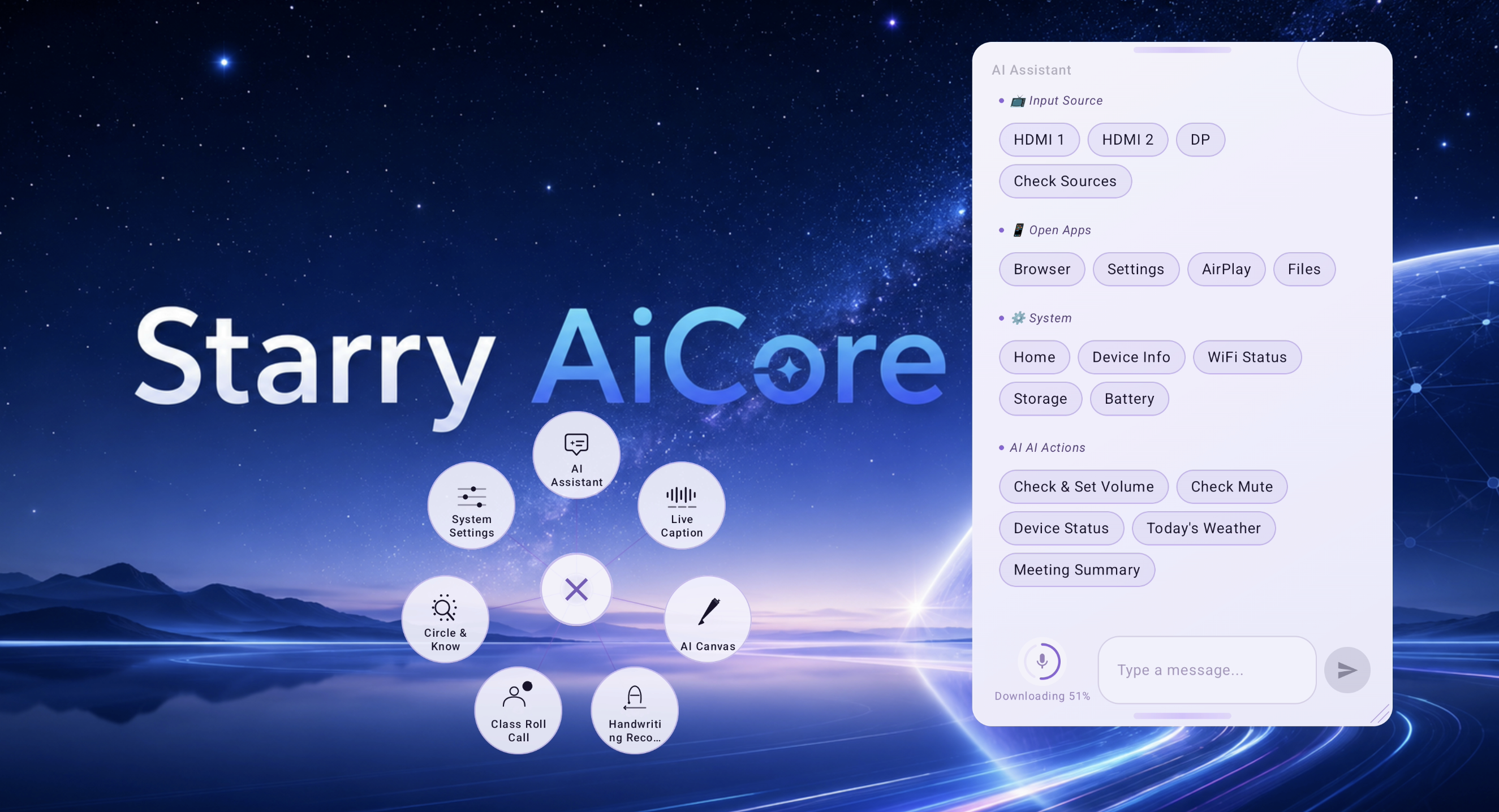
这张界面同时展示了悬浮环形入口与 AI 助手面板。当前可见的快捷能力包括输入源切换、应用打开、设备信息查询、音量控制、静音检查、天气查询,以及会议总结等动作。

  • 悬浮入口与助手面板同屏,说明能力可跨应用直接调用。
  • 快捷动作按输入源、应用、系统、AI 动作分组,信息架构清晰。
  • 底部同时具备语音输入、文本输入与发送入口,适合连续交互。
双通道实时转写,并行承载不同来源与不同翻译视角
实时字幕

双通道实时转写,并行承载不同来源与不同翻译视角

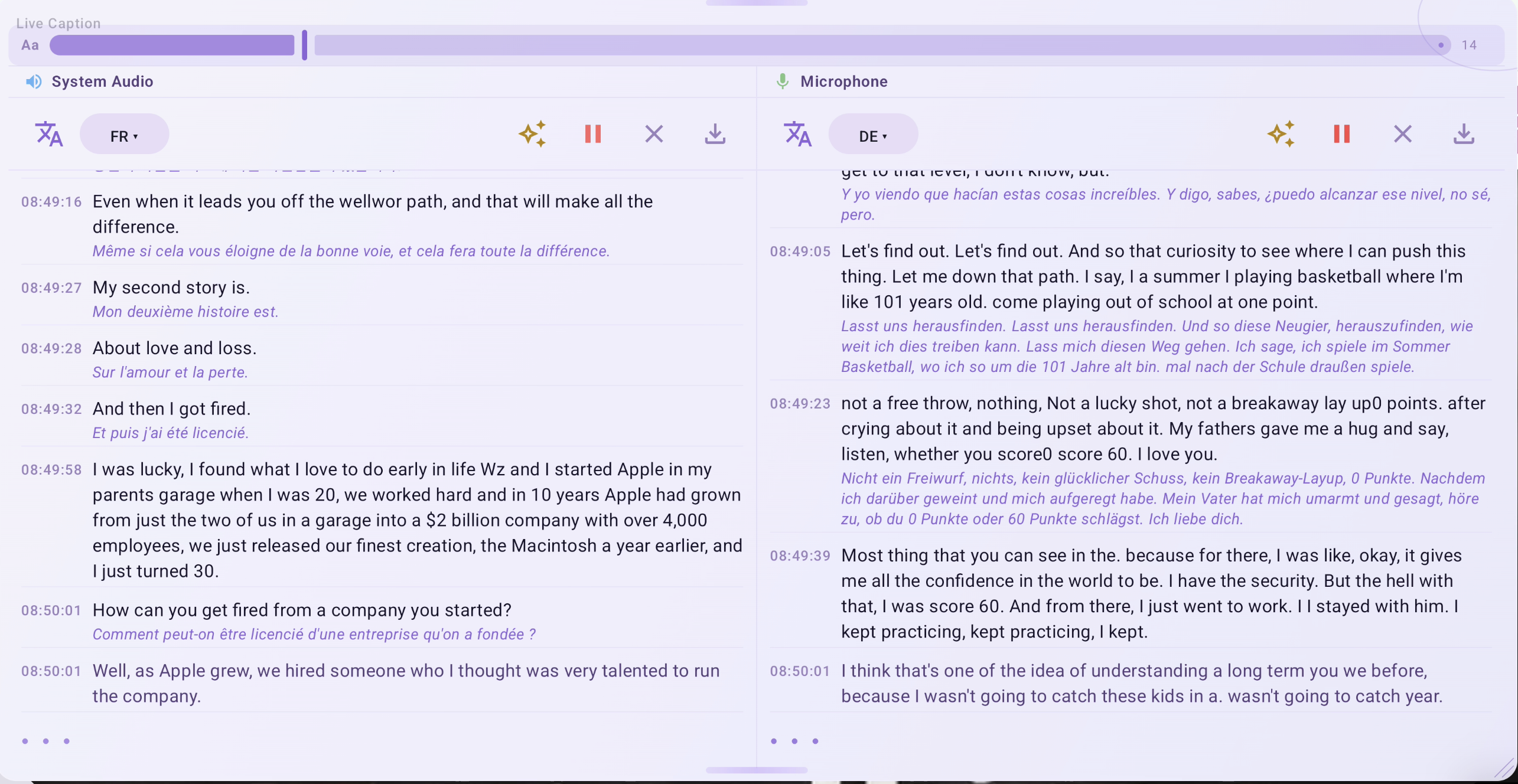
截图清楚展示了左右两个同步流:左侧为系统音频,右侧为麦克风。两边各自具备目标语言选择,正文区保留时间戳,并在原文下方直接给出译文。

  • 系统音频与麦克风并行处理,而不是混成单一路字幕。
  • 每个通道都能独立设置目标语言,这一点在界面上清晰可见。
  • 标题区直接放入总结、暂停、清空、导出等高频动作。
从自由圈选到结构化识别结果,一次完成理解与后续操作
圈选识别

从自由圈选到结构化识别结果,一次完成理解与后续操作

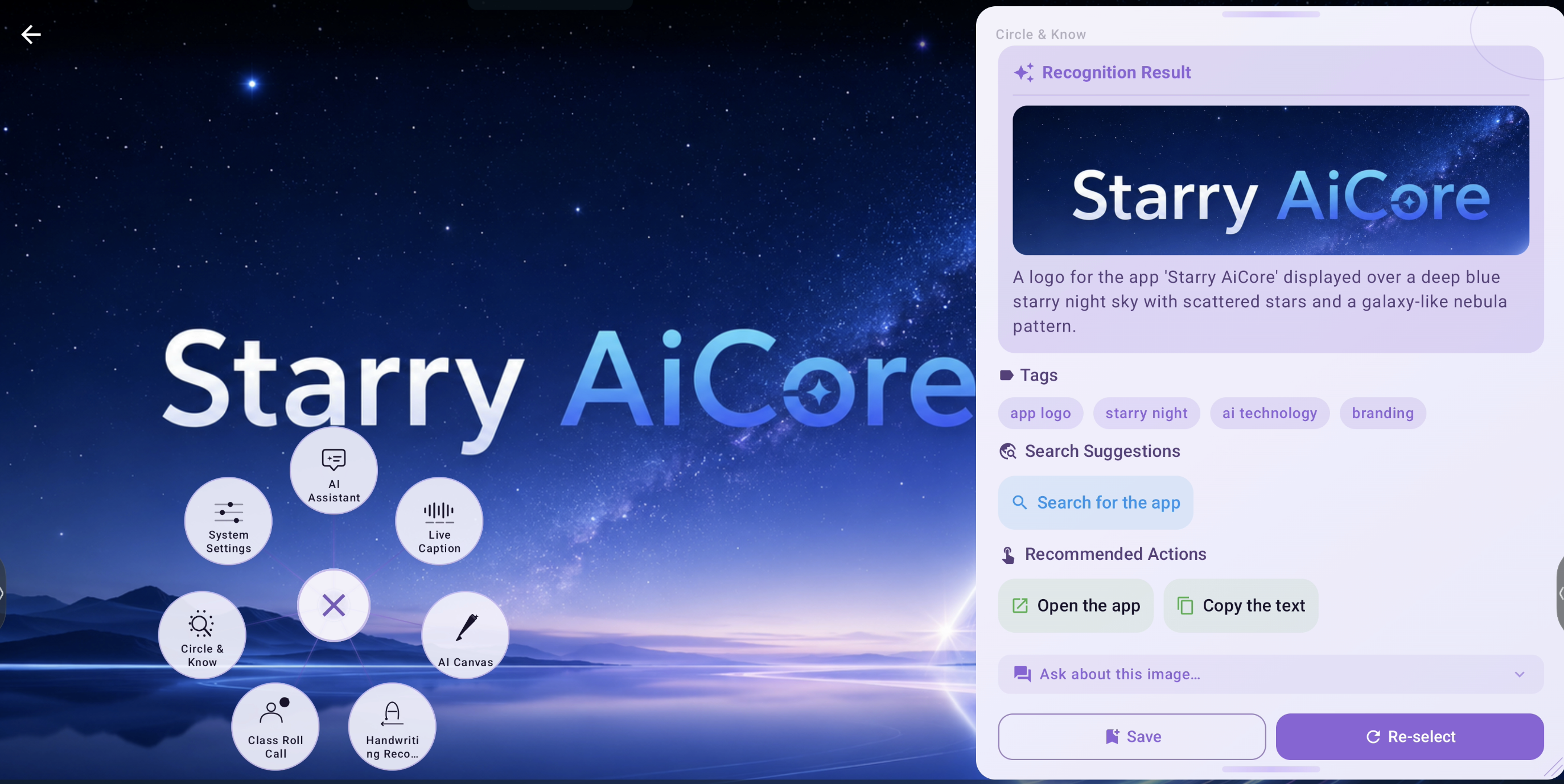
结果页证明 Circle & Know 不只是 OCR。圈选后,它会返回图像预览、自然语言描述、语义标签、搜索建议,以及打开应用、复制文本等后续动作。

  • 结果同时包含视觉预览与语义解释,不只是提取文字。
  • 标签与搜索建议直接内建在结果卡片中,不需要跳出到外部页面。
  • 动作按钮说明识别结果可以继续流转到后续任务。
从草图出发,而不是从完整提示词出发
AI 画布

从草图出发,而不是从完整提示词出发

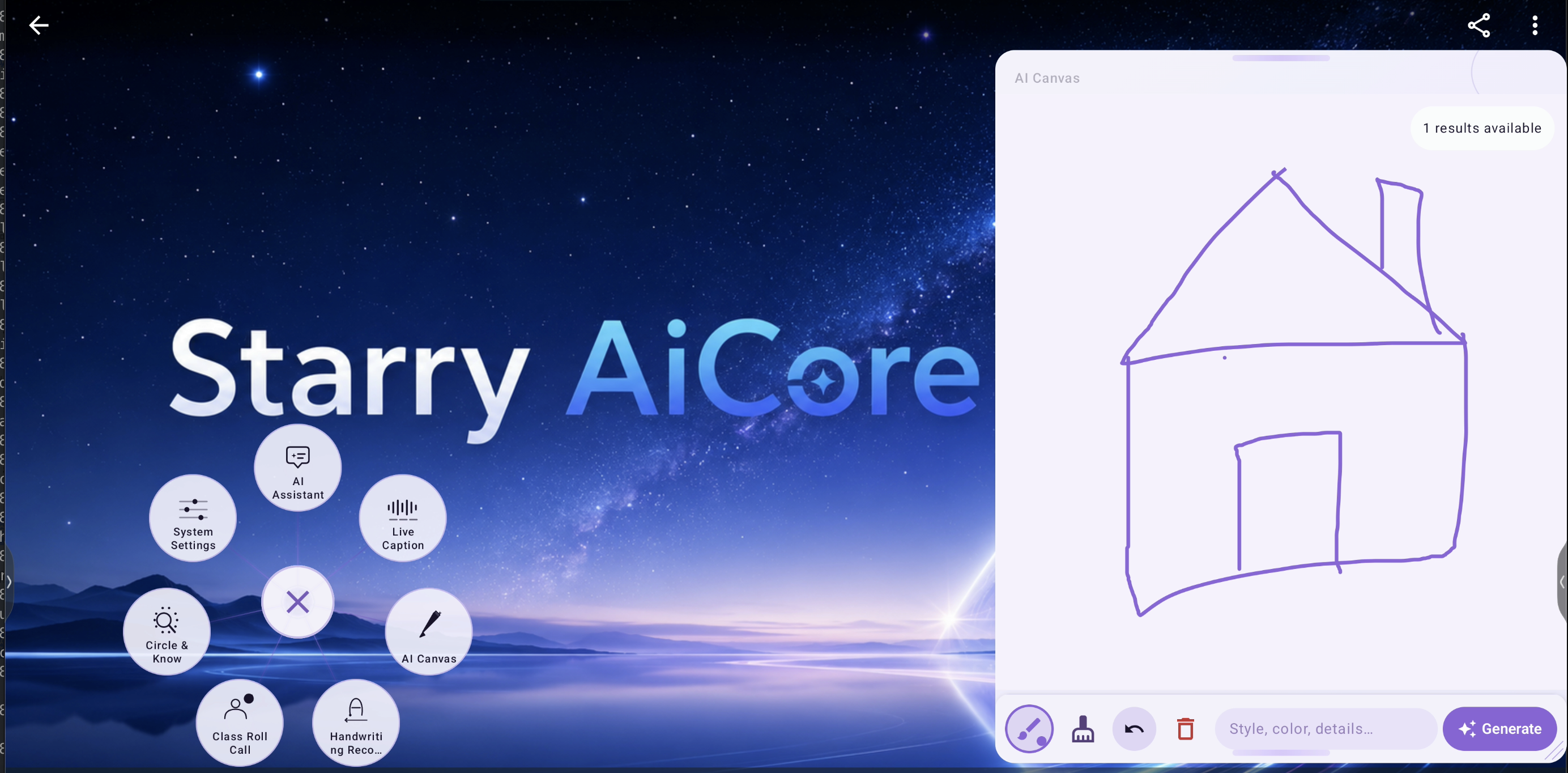
界面中可见手绘房屋草图、内联风格提示输入框,以及同屏生成按钮,说明构图与文本指令是在一个工作面板里共同完成,然后再进入生成。

  • 画笔、橡皮、撤销、删除、提示词输入与生成按钮全部同屏可达。
  • 截图证实它支持先画再生成,而不是只做文生图。
  • 右上角已有结果提示,说明这是可连续迭代的生成流程。
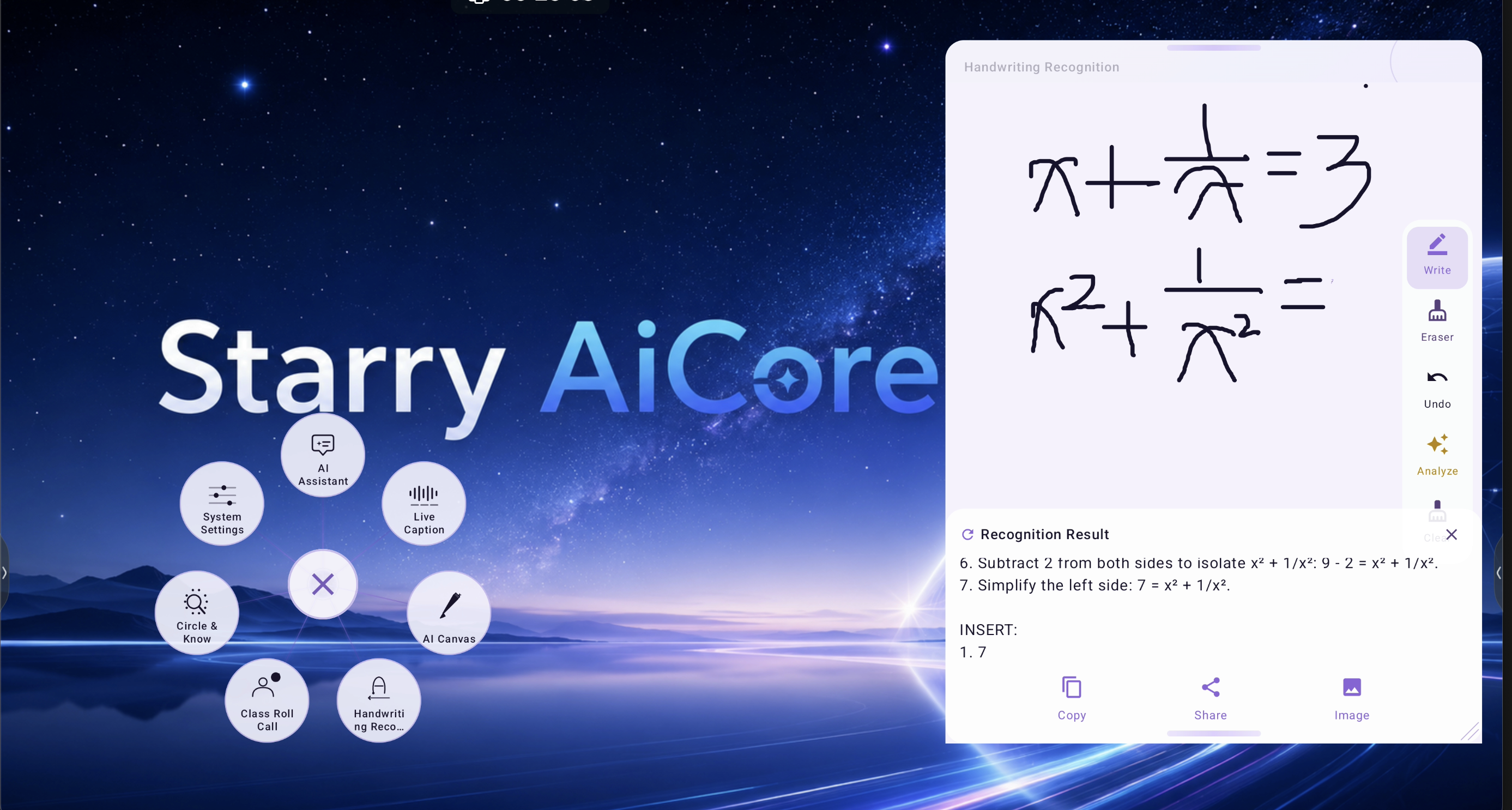
数学手写内容被识别、分析,并输出为可继续使用的结果
手写识别

数学手写内容被识别、分析,并输出为可继续使用的结果

上半区是手写表达式,下半区是识别结果。结果区不仅有分析文本,还有复制、分享、导出图片等动作,说明识别后的内容被设计成可复用资产,而不是一次性查看结果。

  • 书写区与结果区分离,便于在解题时保持阅读清晰。
  • 右侧可见书写、擦除、撤销、分析、清空等完整工具链。
  • 输出动作支持识别结果直接二次分发。
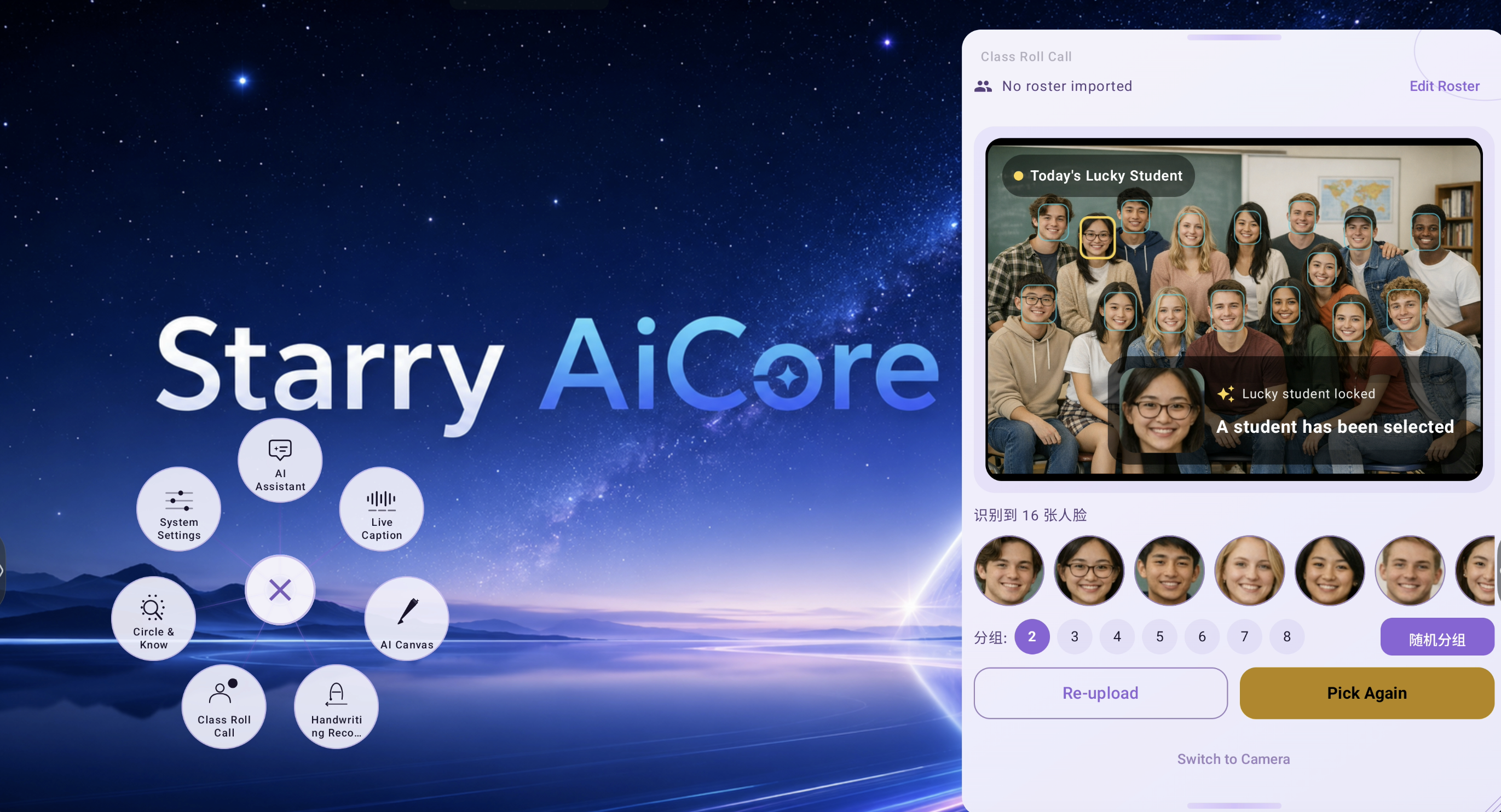
基于人脸识别的课堂互动,支持分组与即时重抽
课堂点名

基于人脸识别的课堂互动,支持分组与即时重抽

这张图直接证明了课堂使用场景:系统识别出 16 张人脸,在班级合照上高亮候选学生,锁定其中一位,并提供分组和重新抽取操作,适合真实课堂反复使用。

  • 界面明确给出了识别到的人脸数量。
  • 被选中的学生会被单独放大展示,不会淹没在整张合照里。
  • 分组、重新上传、再次抽取等动作都已经进入主界面。
Agent 自动化引擎

核心差异化能力。自主执行、安全可控、越用越聪明。

Execution Pipeline

1
Natural Language Input

用户用自然语言说出或输入任务

2
AI Planning

AI 规划引擎将任务分解为步骤序列

3
Screen Reading

无障碍服务读取当前 UI 树状态

4
Action Execution

Agent 自主执行:点击、输入、滚动、导航

5
Result Verification

检查结果,必要时重规划,报告完成

Capability Matrix

能力示例分类
Open appsOpen Chrome browserApp Control
Navigate UISettings → Display → BrightnessUI Navigation
System controlSet volume to 50%, switch to HDMI 1System
Query infoCheck storage space, battery levelInformation
Cross-app tasksOpen WeChat, send message to Zhang SanMulti-App
Complex logicCheck mute → unmute → report volumeMulti-Step
Input automationSearch 'weather' in browserInput
Status reportsGenerate full device status reportReporting

Safety Guarantees

  • Security keyword filtering blocks sensitive operations
  • Max step limit (default 10) prevents infinite loops
  • User can manually terminate at any time
  • Full execution logging for audit and debugging
技能学习系统

每次成功执行都让 Agent 更聪明。可复用技能、可搜索技能库、跨设备共享。

Automatic Learning

After each successful task, the Agent analyzes the execution pattern and creates a reusable skill template with JavaScript automation code.

Skill Library

All learned skills stored locally with metadata — name, description, JS template, verification status. Full CRUD via Web Console.

Smart Reuse

When a new task matches an existing skill, the Agent reuses the proven template instead of planning from scratch — faster, more reliable.

Cross-Device Sharing

Export skills as JSON and import on other devices. Build a skill library once, deploy everywhere.

Search & Verify

Search by keyword. Mark skills as verified for production. Delete obsolete or unreliable ones.

企业级管理

OTA 升级、远程配置、热更新——管理设备集群无需接触任何一台。

OTA Auto-Update

Keep every device on the latest version automatically.

  • Automatic version detection via remote update.json
  • Floating update dialog — non-blocking, no workflow interruption
  • Background download with real-time progress (DownloadManager)
  • One-tap install via FileProvider
  • Force update option for critical releases
  • Release notes display for every update

Remote Config & Hot Reload

Change product behavior without shipping a new APK.

  • Panel visibility: show/hide feature panels remotely per device group
  • AI behavior switching: adjust reasoning profiles without app update
  • Prompt hot-reload: edit system prompts via Web Console instantly
  • License policy: adjust per-panel activation policies remotely
  • Brand customization: entry icon, color scheme per client
  • Feature flags: toggle settings sections, debug features, experiments
  • Server endpoints: update all service URLs remotely
激活与授权

默认免激活试用 3 天,并支持激活码发放与商业授权合作。

Default 3-day activation-free trial for evaluation · OEM auto-activation via MAC whitelist · Enterprise activation by license key. Email support@starry-aicore.com to request an activation code or discuss commercial cooperation. AES-256 encrypted storage. Panel-level policy gating.

全球化就绪

12 种语言,一套代码。含 RTL 支持。

English简体中文日本語한국어EspañolFrançaisDeutschItalianoPortuguêsРусскийTürkçeالعربية
常见问题

关于 AICore 能力、部署和授权的快速解答。

What is Starry AICore?

Starry AICore is a system-level Android AI workspace that floats above any app. It combines a persistent floating entry with 10+ AI panels including an AI assistant with Agent automation, live captions with translation, screen OCR, AI art generation, handwriting math recognition, and classroom roll call. It supports 12 languages and three deployment modes (cloud, hybrid, fully offline).

How does the Agent automation work?

The Agent uses Android Accessibility Service to read the UI tree, then an AI planner organizes multi-step actions. It can tap buttons, type text, scroll, navigate between apps, and control system settings — all autonomously. Security filters block sensitive operations, and a max-step limit prevents infinite loops.

Can AICore work offline?

Yes. AICore supports cloud-connected, hybrid, and fully offline deployment modes. Core voice and interaction capabilities can continue working in offline-oriented deployments without depending on continuous internet access.

How do I activate AICore?

AICore supports a default 3-day activation-free trial for evaluation. OEM devices can activate automatically via MAC whitelist, and enterprise deployments use license keys. Email support@starry-aicore.com to request an activation code or discuss commercial cooperation.

What Android version is required?

Android 8.0 (API 26) minimum. Full feature support on Android 15. Recommended: 3GB+ RAM.

How is AICore updated and managed?

OTA updates are automatic with background download and one-tap install. Remote configuration lets you toggle features, adjust AI behavior, edit prompts, and update license policies — all without shipping a new APK. The built-in Web Console provides LAN-based remote administration.

开始使用

默认可免激活试用 3 天。获取激活码与商业合作请发邮件至 support@starry-aicore.com。

support@starry-aicore.com开始使用
申请演示